
Functions 02
OPENING QUESTION: Open SNAP check out THIS program.
Take a few moments to digest what's going on there (solo).
Then review with your group...
You SHOULD see a coupla something interesting/unusual there.
LEARNING TARGET:
I will be able to write a basic function in SNAP during today's class
═══════════════════════════
WORK O' THE DAY:
Let's review the opener -- what is a 'script variable' and why do we care?
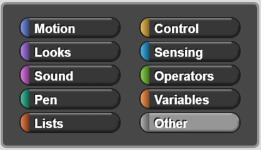
Notice that to make a function in SNAP we click on the scripting area and select "Make a Block" as shown below:

═══════════════════════════
Take a few moments to divide up an analysis of this opening screen. There are four sections there, please work as directed below, to determine what that feature does and/or how it works:
OH and (hint! hint! hint! the help/user manual can be helpfull... but it's oddly difficult to find)
green folk-- please work on this:
orange people-- digest this:
folk designated by the color red, this part belongs to you:
And lastly (but not leastly) blue people get to work on this:
═══════════════════════════
Now let's imagine we wrote some code to calculate the area of a triangle:
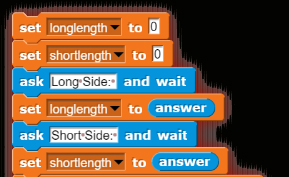
Sooo... we'll probably start out with *Something* that looks like this to get user input for the sides of the triangle:
═══════════════════════════
Now let's imagine that our code has a great deal more to it, but that the very first thing we have to do is calculate the area of a rectangle.
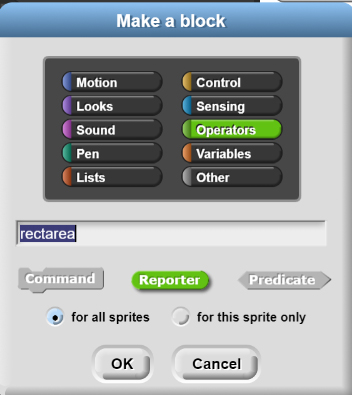
Soooo... we click on the scripting area which brings up the "Make a block" dialog box
Step #1: Choose where to save my function. Notice the color changes as you change block types. I think that my function will act sorta kinda like an operator so I chose to save my function there (you can choose to save your function anywhere, however)
Step #2: Naming my function. Since my function will calculate the area of a rectangle I named it "rectarea"
Step #3: Recall from our previous conversations that we must define HOW our function returns data or whether it returns data at all. This MUST be done when you create your function. You can't go back and change it later. My particular function is going to *receive* two pieces of data from the main program, and then return one value (the area of the rectangle). Since this function is going to return data I must choose it to be a REPORTER block.
Note: "Predicate" Blocks return
or
only and "Command" blocks don't return anything at all
Step #4: Recall that variables can be either Global or Local. The same applies to functions. We can define a function to be used by every sprite everywhere (global) or we can define a function so that it only works with the current sprite (local). In this case, there's a chance I may need to perform this calculation with other sprites, so I'll make it global.
═══════════════════════════
Writing the Function
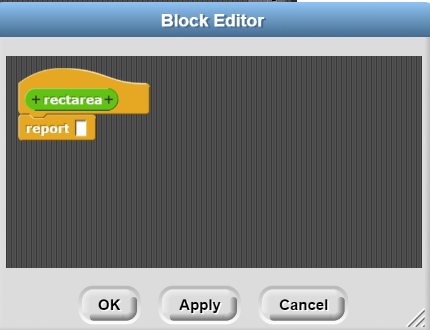
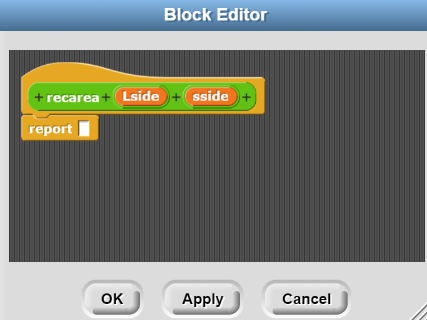
After you've defined and named your function, SNAP pops up the following dialog box:
It's particularly important that you notice the "+" sign next to the function name and the "report []" block.
The "+" allows us to add "parameters"-- which are values "passed in" from the main program. In this case, the main program is "passing in" two variables, "Longside" and "Shortside". It makes sense then, I hope, that we have to provide two variables to hold the data that gets passed in to our function.
Some programmers consider it to be BAD programming practice to use the same variable name for the data being passed in and the data inside the function. Personally, I think it's kinda confusing to use the same name for the parameter being passed in and the name of the variable in the function. Sooooo, for now, I'd prefer that you use different names for each.
Once you get more comfortable programming, you can go with naming the same value for both.
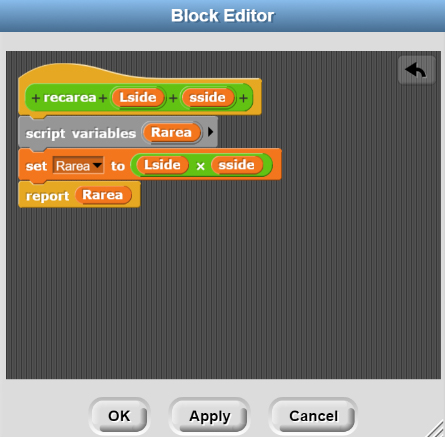
Now I can write the code:
Work with your group to digest that code (it takes some getting used to)
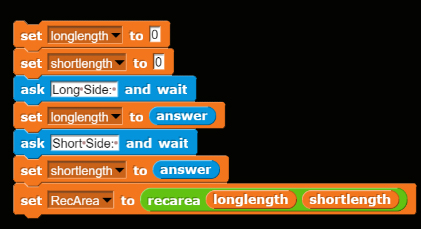
And here's the final main program code (it is also kinda weird, and it also takes some getting used to):
What do you suppose the main program will display?
What happens if the user types in "Eric" when prompted for the Long Side?



HOMEWORK: